


Autism Speech and Language
3.820.00 Reviews
App Specs
- Version
- 1.0.3
- Updated On
- License
- Free
- Downloads
- 50,000+
- Developer
- SpeakEasy Community
- Categories
- Parenting
- Platform
- Android
Screenshots
 Analysis by AppCompare
When a child has a communication goal, it can be hard to turn practice into something that fits naturally into family life. I find Autism Speech and Language most useful as a possible source of structured, playful practice—not as a replacement for a speech-language professional or a shortcut to progress. The app is aimed at parents of autistic children, but caregivers and educators may also find it worth exploring if they want activities to use alongside their existing approach.
Where families can get stuck
Speech and language support is personal: an activity that feels inviting to one child may frustrate another, and a skill that appears during a game may not carry over to an ordinary conversation right away. That is why I would treat any app-based activity as an opportunity to practise, not as proof that a child has mastered a skill. A calm, low-pressure session is more useful than trying to push through when a child is tired or no longer interested.
Another common snag is expecting an app to tell a family exactly what to do. The description of this app points to speech and language development, while the experience will still depend on the child’s communication profile, interests, and support needs. Before starting, I would choose one practical aim—such as encouraging a request, taking turns, or naming something familiar—and keep the session focused on that rather than trying to work on everything at once.
The app is free to download, but it includes in-app purchases ranging from $11.99 to $71.88 per item. I would check the purchase details before committing to anything and make sure the child cannot accidentally make a purchase during an activity. That small bit of preparation matters when a phone or tablet is being used in a shared family setting.
Setup checks that make a first session easier
Before handing over the device, I would make sure it runs a compatible operating system; the listed minimum is version 8.0. I would also open the app myself first, look through the available options, and decide how I want to introduce it. That gives a parent a chance to understand the flow before a child is asked to interact with it, and it avoids turning the first session into a troubleshooting exercise.
It helps to choose a familiar, quiet moment rather than introducing a new app in the middle of a rushed transition. Keep the first try short and watch the child’s response: do they understand what is being asked, enjoy the activity, or need a simpler prompt? If a screen-based task is not holding their attention, pausing is a sensible choice, not a failed session.
I would also agree on a simple stopping point before beginning. For example, a caregiver might try one activity, then move into a related real-world moment such as asking for a snack or choosing a book. This makes the device a prompt for interaction rather than the whole event. It also gives adults a clearer sense of whether the app is supporting a useful routine.
Worth Reading Before You Choose

EA SPORTS FC Mobile 26 Is a Bigger Football Game, but It Takes Time

Flipboard Shows What News Apps Must Do Beyond the Feed

Switching to Android Auto Means Rethinking Your Driving Routine

Google Calendar Makes a Crowded Week Easier to Manage

Ludo King Makes the Most of the Minutes Between Plans

Baby Panda World Brings Quick Play to Modern Phones, but Its Game Library Feels Busy
First Impressions: A User-Friendly Experience
Right off the bat, what I loved about the app is how user-friendly it is. The interface is clean and intuitive, so even if you’re not super tech-savvy, you’ll have no trouble navigating through the app. The developers clearly put a lot of thought into making it accessible for everyone.
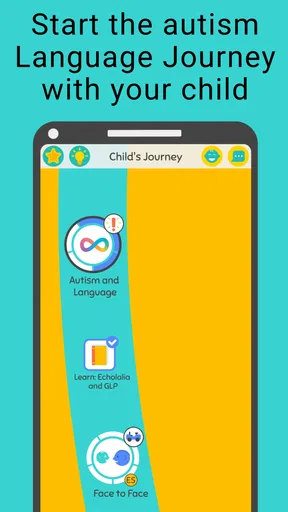
As soon as you open the app, you're greeted with a welcoming dashboard that highlights all the main features. It’s designed to guide you step-by-step, which is perfect for those who might feel overwhelmed by techy stuff. The colors are soft and calming, setting a nice tone for both kids and adults.
Features That Stand Out
Let’s talk about the features because honestly, that’s where this app really shines. One of the standout features is the personalized learning plans. The app tailors activities based on the child’s specific needs, which is fantastic because every child is unique, right?
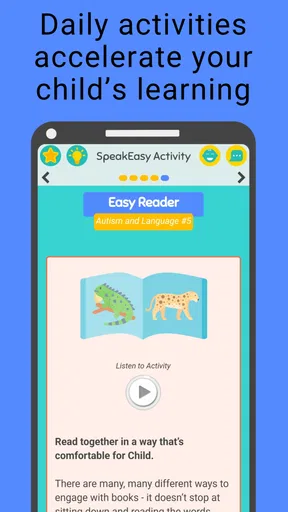
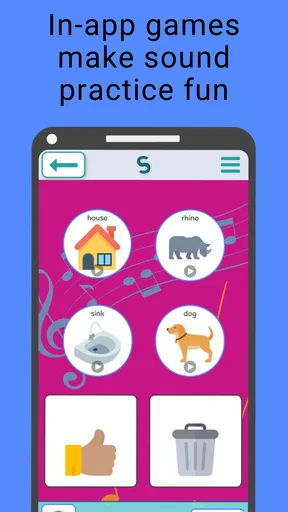
Another cool feature is the interactive games. They’re not just fun, but also super engaging and educational. These games focus on enhancing speech and language skills, and they’re designed to be played together, encouraging social interaction. The app includes a variety of games that cater to different skill levels, so there's something for everyone.
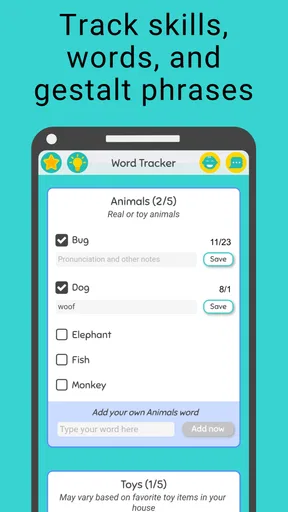
Plus, there's a comprehensive progress tracking system. This is a game changer for parents and educators because you can easily monitor improvements over time. It helps you understand what areas need more focus, making it easier to tailor your approach.
Learning Through Play
One thing I really appreciate is how the app emphasizes learning through play. Kids are naturally curious and playful, and this app leverages that. The activities are designed to be engaging and educational, without feeling like a chore. It’s a win-win!
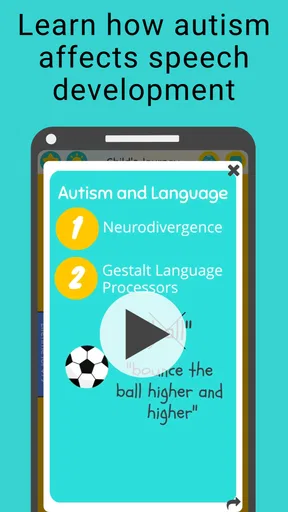
The use of visual and auditory cues in the activities is spot-on. It helps in capturing the child’s attention and makes learning more effective. The app uses real-life scenarios to teach language skills, which I find incredibly beneficial. It bridges the gap between learning in a controlled environment and applying those skills in real life.
Tailored for Every Child
The personalized approach of the app is what sets it apart. The app asks for input on the child’s strengths and challenges to create a customized learning path. This ensures that the activities are not only relevant but also challenging enough to promote growth.
There's also a section for tips and resources for parents and caregivers. This is a treasure trove of information, offering advice on how to support your child’s speech and language development outside of the app. It’s like having a speech therapist in your pocket!
Making practice work in everyday life
A practical way to use this kind of tool is to connect an activity with something the child already enjoys. If a child is interested in a toy, snack, or book, a caregiver can use that familiar topic to encourage a choice or a request, then give the child time to respond in their own way. I would avoid turning every exchange into a test. Following the child’s attention can keep practice warm and natural, while the app provides a more structured activity when that is a good fit.
For instance, a parent might try a brief session after a calm part of the day, then carry one idea into a shared activity at home. If the child uses a gesture, sound, word, or other communication method, the adult can acknowledge it and respond meaningfully. The point is not to demand a particular response because a screen prompted it; it is to create more chances for the child to communicate successfully.
A useful trade-off to keep in mind is that an engaging game can make practice easier to begin, but it may also make the device itself the focus. I would sit alongside the child when possible, notice what captures their interest, and keep the interaction going beyond the screen. That helps a caregiver judge whether an activity feels supportive rather than simply entertaining.
Recovering when a session goes off track
If an activity does not load or the app seems unresponsive, I would first close and reopen it, then check that the device is running a compatible system and that other basic device functions are working normally. If the difficulty continues, restarting the device is a straightforward next step. These are general checks, not a guarantee that every issue has the same cause, but they can help distinguish a temporary device hiccup from a problem that needs further support.
If the app opens but a child cannot follow an activity, I would not assume the child is being uncooperative. The instructions, timing, sensory demands, or task itself may not suit that moment. Try again when the child is more settled, offer help in the way that already works for them, or stop and return later. If progress information or an activity does not appear as expected, avoid repeatedly changing several things at once; make one simple adjustment and see whether it helps.
It is also worth keeping expectations modest when using progress tracking. A record can help a parent notice patterns, but day-to-day communication varies with energy, context, and comfort. I would use observations from the app as one part of a broader picture, alongside what happens during meals, play, school, and conversations with the child’s support team.
When the app is not the cause—or not the right fit
Not every difficult session points to a technical fault. A child may be hungry, tired, overstimulated, or simply uninterested in that activity. A touch screen can also be less accessible for a child who finds tapping, waiting, or listening difficult. In those situations, an adult-led activity away from the device, or advice from a speech-language professional familiar with the child, may be a better choice than trying to make the app work harder.
Compared with printable exercises or activities made up on the spot, an app can offer a more guided and playful format. Compared with individual support from a professional, though, it cannot take the same role of observing a child in context and adapting guidance with clinical judgement. I see it as a possible supplement for home practice, not a substitute for tailored professional input. Families already using a communication approach recommended by their child’s team should keep that guidance at the centre.
This may not be the right choice for families looking for a complete therapy program, a guaranteed developmental outcome, or an app that suits every child without adult involvement. It is also less appealing if a child strongly dislikes screen activities or if the household wants to avoid paid in-app options. The best fit is likely a caregiver willing to explore the activities, supervise use, and decide calmly whether they support the child’s existing goals.
Who may find it useful, and what to check
SpeakEasy Community develops this parenting app, which has an average rating of 4.0 from around 63 ratings and over 10,000 installs. It is free to get, rated for Everyone, and its current version is 1.0.2. Those details can help set expectations about its place in the app market, but they cannot predict whether a particular child will enjoy it or benefit from its activities.
Before trying it, parents may reasonably wonder whether it costs anything to start, whether it is meant for children, and whether it replaces professional help. It is free to download, with optional purchases priced from $11.99 to $71.88 per item; the Everyone age rating indicates broad content suitability, not that every activity is suitable for every child. I would treat it as a home-support tool and discuss specific communication goals with the child’s qualified support team rather than relying on an app alone.
It may suit a parent who wants guided activities to explore with a child, an educator looking for another possible practice resource, or a caregiver who wants to make short, shared language activities part of an existing routine. Someone who needs a fully individualized therapy plan, prefers non-digital materials, or wants a resource with no in-app purchase options should compare alternatives before settling on it.
Wrapping It Up: Is It Worth It?
So, what’s the verdict? If you’re looking for a comprehensive tool to support speech and language development for kids on the autism spectrum, the app is definitely worth checking out. It combines play and learning in a way that’s both fun and effective.
The app is not just another educational tool; it’s a supportive companion in your child’s learning journey. Whether you’re a parent trying to find engaging activities or an educator seeking resources to enhance your teaching, this app has something valuable to offer.
Give it a try and see how it can make a difference in your child’s development. Remember, every step forward is a victory, and with the right tools, those steps become a little easier.
My practical verdict
I would try it when a child is comfortable with a device and a caregiver can join in, especially if the family wants playful activities to complement existing support. I would begin gently, watch how the child responds, and keep the focus on communication rather than completing screens or chasing a score. If the app adds pressure, creates conflict, or does not match the child’s needs, it is reasonable to pause and use another approach.
For me, the strongest reason to consider it is the possibility of giving families a structured starting point for shared practice. The main caution is to keep its role clear: it can be one resource among many, while the child’s own interests and professional guidance should shape what happens next. With that balance, it is a reasonable free download to explore, provided you review any optional purchase before choosing it.
Pros
- User-friendly interface for easy navigation.
- Wide range of activities for skill development.
- Customizable settings to suit individual needs.
- Supports multiple languages for diverse users.
- Engaging visuals keep users motivated.
Cons
- Limited free content; subscription required.
- Requires constant internet connection.
- Some activities may feel repetitive.
- Limited offline functionality.
- Occasional glitches in progress tracking.
FAQs for Autism Speech and Language
What is Autism Speech and Language?
Autism Speech and Language is an app designed to assist individuals with autism in developing their speech and language skills. It offers interactive exercises, visual aids, and engaging activities tailored to various age groups and levels of speech development. The app aims to support both children and adults in improving communication abilities.
Is Autism Speech and Language suitable for all ages?
Yes, Autism Speech and Language is designed to accommodate a wide range of ages. The app includes customizable features that allow users to adjust the difficulty level and content, making it suitable for both young children and adults seeking to enhance their speech and language skills.
What features does Autism Speech and Language offer?
The app provides a variety of features, including interactive exercises, visual and auditory aids, progress tracking, and personalized learning paths. It also offers speech recognition technology to give real-time feedback, helping users improve their pronunciation and communication skills effectively.
Can Autism Speech and Language be used offline?
Autism Speech and Language requires an internet connection for initial download and certain features, such as updates and cloud-based progress tracking. However, many exercises and activities can be accessed offline, allowing users to continue their practice without needing a constant connection.
How does Autism Speech and Language support caregivers and educators?
The app includes resources for caregivers and educators, such as guidance on how to use the app effectively and tips for facilitating communication in everyday situations. It also allows for multiple user profiles, enabling caregivers and educators to track progress and tailor activities to individual needs.


